PHP Date and Time Function:-
PHP date and time function का use date एवम् time को प्राप्त करने के लिये किया जाता है । जब PHP Script run हो रही है तब हम date and time function को कही तरीके से date and
time के अनुसार format कर सकते है । यह function local server की setting पर depend होते है ।
PHP date and time function PHP core के part होते है इन्हें use करने के लिये हमें कोई भी installation Requir नहीं होता है ।
For Example:- checkdate() function date format को check करने के लिये use में आता है इसका syntax निम्न है
Syntax :- checkdate(month,day,year);
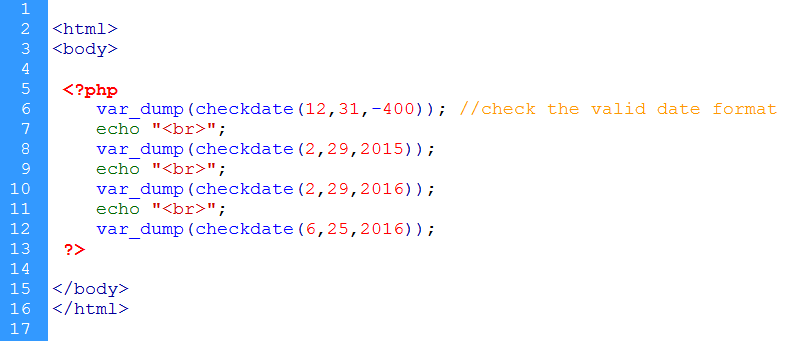
Figure:-1 Use Of abs() function
उपरोक्त code को जब हम browser पर run कराते है तो following Output produce होता है -
Output
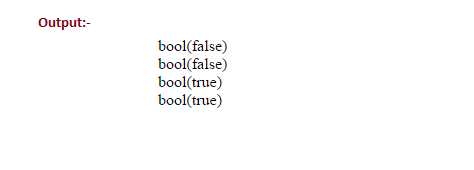
Figure:-2 abs() function Output
उपरोक्त code में यदि date format सही है तो output true return होता है otherwise false return होता है ।
| Function |
Description |
| checkdate() |
check the date validation |
| date_add() |
Adds days, months, years, hours, minutes, and seconds to a date |
| date_create_from_format() |
Returns a new DateTime object formatted according to a specified format |
| date_create() |
Returns a new DateTime object |
| date_date_set() |
Sets a new date |
| date_default_timezone_get() |
Returns the default timezone used by all date/time functions |
| date_default_timezone_set() |
Sets the default timezone used by all date/time functions |
| date_diff() |
Returns the difference between two dates |
| date_format() |
Returns a date formatted according to a specified format |
| date_get_last_errors() |
Returns the warnings/errors found in a date string |
| date_interval_format() |
Formats the interval |
| date_isodate_set() |
Sets the ISO date |
| date_modify() |
Modifies the timestamp |
| date_sub() |
Subtracts days, months, years, hours, minutes, and seconds from a date |
| date_sunrise() |
Returns the sunrise time for a specified day and location |
| date_sunset() |
Returns the sunset time for a specified day and location |
| date_time_set() |
Sets the time |
| date_timezone_get() |
Returns the time zone of the given DateTime object |
| date_timezone_set() |
Sets the time zone for the DateTime object |
| date() |
Formats a local date and time |
| getdate() |
Returns date/time information of a timestamp or the current local date/time |
| gettimeofday() |
Returns the current time |
| gmdate() |
Formats a GMT/UTC date and time |
| idate() |
Formats a local time/date as integer |
| localtime() |
Returns the local time |
| microtime() |
Returns the current Unix timestamp with microseconds |
| time() |
Returns the current time as a Unix timestamp |
| timezone_name_get() |
Returns the name of the timezone |
| timezone_offset_get() |
Returns the timezone offset from GMT |
| timezone_open() |
Creates new DateTimeZone object |
| timezone_transitions_get() |
Returns all transitions for the timezone |
| timezone_version_get() |
Returns the version of the timezone db |
For Example:- date_format() function date format को check करने के लिये use में आता है इसका syntax निम्न है
Syntax :- date_format($date,"Y/m/d");
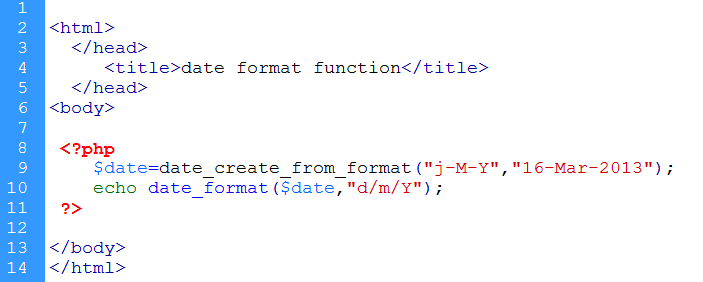
Figure:-1 Use Of date_format() function
उपरोक्त code को जब हम browser पर run कराते है तो following Output produce होता है -
Output
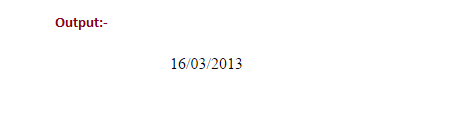
Figure:-2 date_format() function Output